
ADVERTISEMENT
ADVERTISEMENT
Managing health care on the go has never been easier, courtesy of the UnitedHealthcare app. Tailored for ease and efficiency, the app presents an innovative way to manage your health needs right from your smartphone. In this review essay, we will delve into the app's features, user reviews, recent updates, device requirements, and permissions to help you navigate the UnitedHealthcare experience effectively.
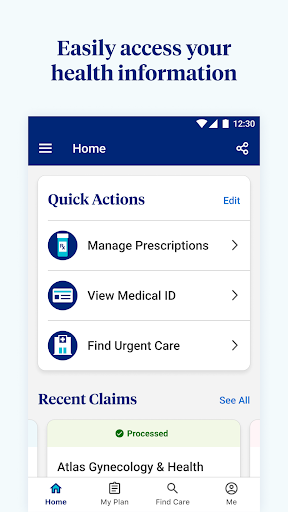
The UnitedHealthcare app is designed with user convenience in mind, offering a set of features that cater to various aspects of health care management. Here’s a detailed look at its primary functionalities:
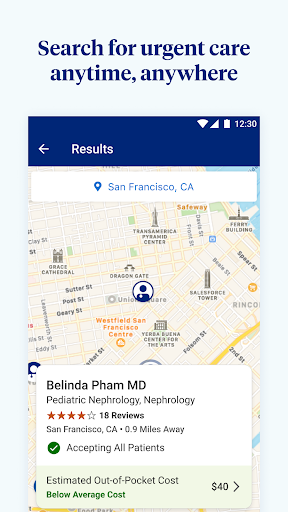
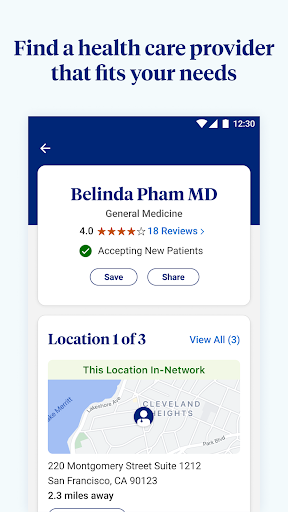
1. Find and Manage Providers: The app simplifies the search for healthcare providers by utilizing a guided and location-based search mechanism. Users can easily find doctors, specialists, or health care facilities tailored to their needs. Moreover, the ability to save favorite doctors or facilities ensures quick access for future visits, making the app a one-stop shop for health care searches.
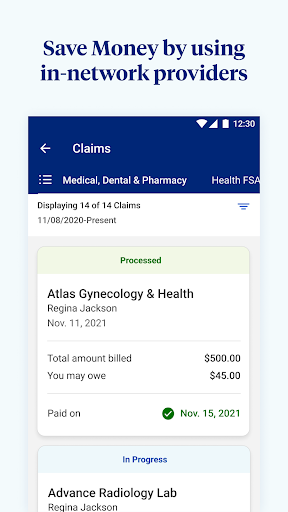
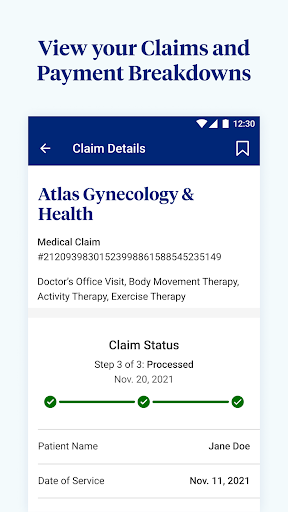
2. Manage Claims: Understanding your health claims can be cumbersome, but the UnitedHealthcare app provides clarity. Users can review their claims based on member, provider, status, facility, service, or date, thus ensuring transparency in health expenditures. In addition, detailed claims payment breakdowns and explanations of benefits (EOBs) are readily accessible, empowering users with knowledge about their health care costs.
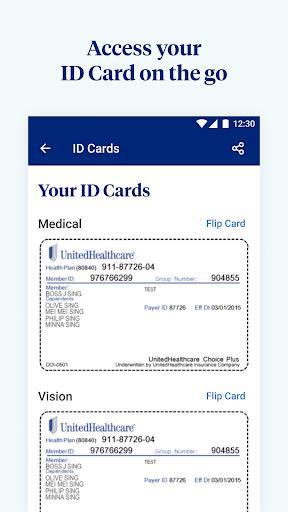
3. ID Card Access: Say goodbye to misplaced insurance cards! The UnitedHealthcare app allows users to view and share their ID card digitally, ensuring you're always prepared. Whether it's an unscheduled visit to the doctor or a routine check-up, accessing your insurance information has never been easier.
4. View Cost Estimates: One of the app's standout features is its ability to provide cost estimates for treatments and specialty services. This transparency is invaluable, helping users understand their potential financial commitments before receiving care.
5. View Account Balances: Financial management is crucial for any health plan holder. The app provides users with the ability to view their health reimbursement, flexible spending, and Optum Bank health savings account balances. This functionality allows users to make informed decisions about their health care spending.
6. Easily Sign In: Security and convenience go hand in hand with the UnitedHealthcare app’s HealthSafe ID™. This enhanced login feature allows users to access nearly all UnitedHealthcare digital tools with one username and password, eliminating the hassle of remembering multiple credentials. For added convenience, a fingerprint login option ensures that users never forget their password again.
7. Manage Your Health: The app also offers personalized recommendations for preventative care. This feature promotes proactive health management, emphasizing the importance of preventative measures in maintaining well-being.
In summary, the UnitedHealthcare app amalgamates essential features that cater to personalized healthcare needs, ensuring that users can manage their health efficiently and effectively.
Feedback from users can provide invaluable insights into the app’s performance and usability. Here are some reviews and ratings directly from users who have engaged with the UnitedHealthcare app:
1. High Satisfaction Ratings: Many users express high satisfaction with the app's overall design and user interface, remarking that it is intuitive and easy to navigate. The seamless ability to find providers and manage claims has garnered positive feedback.
2. Suggestions for Improvement: Some users have noted that while the app is functional, they would appreciate more robust features such as the ability to schedule appointments directly through the app. Incorporating appointment scheduling could enhance user experience significantly.
3. Claims Management Praise: Users particularly commend the claims management feature, stating that it provides detailed breakdowns that clarify billing processes. This has reduced confusion and improved understanding of personal health expenses.
4. Technical Issues: A few users have reported facing occasional glitches or slow loading times, which can hinder the overall experience. Continued improvement in this area would bolster the app’s reliability.
Overall, the reception of the UnitedHealthcare app demonstrates a generally positive trend, with constructive feedback paving the way for future enhancements.
Frequent updates play a crucial role in the enhancement and reliability of applications. The UnitedHealthcare app is no exception, continually improving user experience based on feedback and technological advancements. Recent updates include:
1. Expanded Provider Database: The latest updates have expanded the database of available providers, making it easier for users to find a suitable healthcare practitioner.
2. Enhanced Security Features: Keeping user data secure is a priority, and the recent updates have included enhanced security protocols to safeguard personal information accessed via the app.
3. User Interface Improvements: The app has undergone user interface improvements to bolster navigation, making the experience even more seamless for users.
4. Additional Health Management Tools: New health-related tools have been introduced to assist users in managing their health more effectively within the app, such as health tracking features that sync with wearable technology.
These updates reflect UnitedHealthcare’s commitment to innovation and responsiveness to user feedback, enhancing the overall functionality and accessibility of the app.
To enjoy the full capabilities of the UnitedHealthcare app, users must conform to specific device requirements. This ensures a smooth experience and optimal performance. Here are the key requirements:
1. Operating System: The app is available for both Android and iOS devices. For Android users, it requires Android 6.0 (Marshmallow) or later versions, while iOS users need at least iOS 12 or higher for optimal performance.
2. Storage Space: Users should ensure they have adequate storage space on their devices to facilitate the app's installation and operation, although the app itself does not require extensive storage.
3. Internet Connectivity: A stable internet connection is necessary to access the app’s features fully. Users are encouraged to connect to Wi-Fi networks or use cellular data for uninterrupted service.
Meeting these requirements ensures that users can enjoy all the functionalities that the UnitedHealthcare app offers.
To facilitate its comprehensive features, the UnitedHealthcare app requires specific permissions during installation. This is essential for optimal functionality and user experience:
1. Location Access: The app requests access to your location to enable location-based searches for healthcare providers, ensuring users can find nearby professionals conveniently.
2. Camera Access: Camera permissions are necessary for users who wish to share their digital ID card or document claims easily.
3. Storage Access: The app may request access to storage for saving essential documents or claims information.
4. Device and App Data: To enhance user experience, the app may access device and app information to manage performance and provide personalized recommendations.
Users can opt to grant these permissions at the time of installation or later in the app’s settings, contributing to a more personalized and efficient health care management experience.
In conclusion, the UnitedHealthcare app stands out as a powerful tool for individuals looking to manage their healthcare needs efficiently on the go. With its user-friendly features, positive user feedback, and ongoing updates, it is clear that UnitedHealthcare is committed to enhancing health care management. By encouraging user engagement and satisfaction, the UnitedHealthcare app represents a forward-thinking approach in the digital health care landscape. For anyone considering the UnitedHealthcare app, download the free UnitedHealthcare apk today and experience the seamless integration of health care management in your palm.
Welcome to AppSparkle - your independent guide to discovering trending and popular apps. Our mission is to provide a user-friendly platform highlighting popular apps available on official stores.
At AppSparkle, we gather and present app information to help you explore options across Google Play and the Apple Store. Our descriptions are based on public sources and aim for accuracy, but we encourage verifying details directly on official store pages.
Important Notice:
AppSparkle is an independent third-party platform. We are not affiliated with, endorsed by, or officially connected to any app developers, brands, Google Play, Apple App Store, or their parent companies. All app names, logos, and trademarks belong to their respective owners.
We strive to make app discovery straightforward. Links provided will direct you to secure download pages on Google Play or the Apple App Store.


