
ADVERTISEMENT
ADVERTISEMENT
In the age of digital inspiration, the Pinterest app stands out as a beacon of endless possibilities for creative minds. Whether you are seeking fashion tips, easy recipes, or fresh ideas for home improvement, Pinterest serves as your personal treasure trove of ideas. In this review essay, we will explore the features, user reviews, updates, device requirements, and permission requirements of the Pinterest app, available for download on both Android and iOS platforms.
The Pinterest app offers a plethora of features designed to enhance user experience and promote creativity. Here are five of the standout features:
1. Discover Everyday Inspiration: The Pinterest app allows users to explore a vast array of ideas that can enrich their daily lives. With billions of "Pins" available—from stunning photography to delectable recipes—the app acts as a visual search engine that curates content tailored to individual preferences. The "Explore" feature ensures that inspiration is just a swipe away, making it easy to find new interests and hobbies.
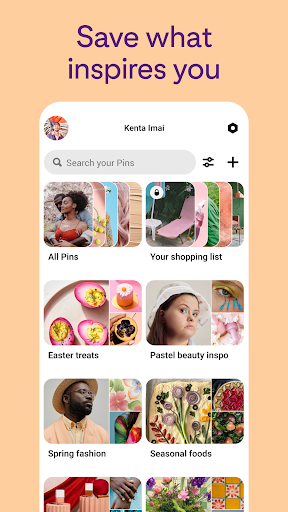
2. Create and Organize Boards: One of the most useful features of the free Pinterest app is the ability to create boards and save your favorite Pins. Users can organize their findings into thematic boards—be it weddings, home decor, fashion, or even bucket lists. This organizational tool is invaluable when planning projects or events, allowing users to visualize their inspirations in one centralized location.
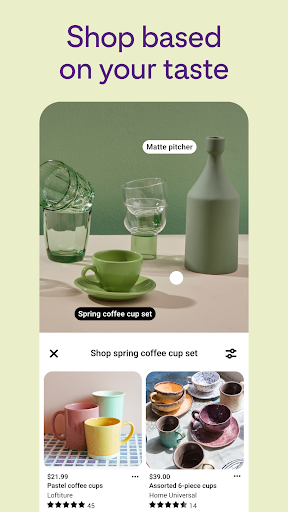
3. Shop Styles You Love: Pinterest hasn’t just dominated the inspiration space; they have also integrated shopping into their platform. Users can discover and purchase styles they love directly from Pins. The app connects to their shopping tab, featuring a wide selection of products, making it simple to shop right from the source of inspiration. This functionality elevates the Pinterest experience, transforming it from merely a planning tool to a full-fledged shopping assistant.
4. DIY Projects and Tutorials: From crafting to home improvements, the Pinterest app is an ideal platform for DIY enthusiasts. Users can find step-by-step tutorials that help them learn new skills and tackle projects with ease. The DIY project Pins often include visual guides and materials lists, enabling crafters and creators to embark on endeavors with confidence.
5. Collage Creation: Pinterest users can express their creativity by creating collages that combine multiple Pins into one cohesive visual. This feature is perfect for those who want to create mood boards or showcase a range of ideas in a visually appealing format. By allowing users to easily drag and drop images, Pinterest reinforces the concept of community and sharing, leading to collaboration and further inspiration.
User feedback provides invaluable insight into the overall experience of using the Pinterest app. Here are some highlights from user reviews across various platforms:
1. Emily J. (5 stars): "I absolutely love the Pinterest app! It has revolutionized how I plan my events. From DIY wedding decor to meal planning, it has everything I need in one place. The board feature is amazing!"
2. Mark T. (4 stars): "The interface is sleek and user-friendly. I can easily find what I’m looking for, and the shopping feature is a game-changer! But sometimes, I wish the search function was a bit more refined."
3. Lucy W. (3 stars): "While I enjoy using Pinterest for inspiration, I sometimes feel overwhelmed by the amount of content. Sorting through so many Pins can be a bit tiring. However, I still appreciate the creativity it brings into my life."
4. James R. (5 stars): "The Pinterest download was seamless on my Android device, and I love how I can save my favorite recipes and DIY projects without any hassle. Fantastic app, highly recommend it!"
5. Sarah P. (4 stars): "I love using Pinterest, but I noticed some limitations on the app compared to the web version. Some features are missing, which is a bit disappointing, but it’s still my go-to for inspiration."
Overall, users have rated the app highly for its vast selection of ideas and ease of use, with a couple of common points of critique focused on content abundance and minor interface limitations.
Pinterest continuously innovates and updates its platform to enhance the user experience. Recent updates have introduced several exciting functions:
1. Video Pins: Pinterest has recently rolled out a feature that allows users to upload and save video content. This development enriches the creative landscape, as users can now share tutorials and experiences in motion, making the app's content even more engaging.
2. Pin Scheduling: For creators and brands, the ability to schedule Pins has been a much-anticipated feature. This allows users to plan and strategize their Pins to coincide with promotional campaigns or seasonal content, optimizing engagement and visibility.
3. Increased Idea Search Filters: The search functionality has been enhanced with refined filters that help users narrow down their searches more effectively. Users can specify categories, themes, and even color preferences to find the exact type of inspiration they seek quickly.
4. Improved Shopping Experience: Updates to the shopping feature have streamlined the purchasing process, making it smoother for customers to buy products directly from Pins. This improvement significantly boosts the app’s utility as a shopping companion.
5. Personalized Recommendations: The algorithm that suggests content to users has gone through major improvements. By analyzing users' interests and behaviors, Pinterest now delivers even more tailored recommendations, helping users find content that resonates with their individual tastes.
These updates reflect Pinterest’s commitment to maintaining a user-centric platform, allowing it to remain relevant and useful in an ever-changing digital landscape.
To fully benefit from the Pinterest app, users must meet certain device requirements. Here’s what you need to know:
1. For Android Users:
- Operating System: Android 6.0 or higher.
- RAM: At least 1 GB for optimal performance.
- Storage: Minimum of 100 MB free space needed for app installation.
2. For iOS Users:
- Operating System: iOS 12.0 or later.
- iPhone: Compatible with iPhone 6 and above.
- iPad: Compatible with iPad 4 and above.
3. Network Connection: A stable internet connection (Wi-Fi or mobile data) is required to browse and save Pins effectively.
Meeting these requirements ensures a smooth and enjoyable Pinterest installation experience, enabling users to make the most of the app's features.
To use the Pinterest app effectively, certain permissions must be granted. Here’s an overview of what is required:
1. Network Access: The app requires access to the internet to load content, search for Pins, and enable real-time updates.
2. Storage Access: Permission to access device storage is needed to save Pins and images within the app, allowing users to easily manage their collections and boards.
3. Camera and Microphone Access: If users wish to create video Pins or upload images directly from their camera, permissions to access these features must be granted.
4. Notifications: Users can choose to allow notifications so they can receive updates on new Pins related to their interests, new features, and tailored suggestions.
By understanding these permission requirements, users can navigate the installation process confidently, ensuring all features of the app are at their disposal.
In conclusion, the Pinterest app is a vibrant platform that fosters creativity and inspiration across various domains. With its user-friendly features, engaging content, and the ability to shop directly for ideas you love, the app is a must-have for anyone looking to enhance their lifestyle. Whether you're aiming to create the life you love or simply searching for new hobby ideas, Pinterest makes it possible. Don't hesitate to download Pinterest today and unlock the door to endless possibilities!



Welcome to AppSparkle - your independent guide to discovering trending and popular apps. Our mission is to provide a user-friendly platform highlighting popular apps available on official stores.
At AppSparkle, we gather and present app information to help you explore options across Google Play and the Apple Store. Our descriptions are based on public sources and aim for accuracy, but we encourage verifying details directly on official store pages.
Important Notice:
AppSparkle is an independent third-party platform. We are not affiliated with, endorsed by, or officially connected to any app developers, brands, Google Play, Apple App Store, or their parent companies. All app names, logos, and trademarks belong to their respective owners.
We strive to make app discovery straightforward. Links provided will direct you to secure download pages on Google Play or the Apple App Store.


