
ADVERTISEMENT
ADVERTISEMENT
Local Weather Forecast& Widget feels like a premium weather intelligence layer for your day, with real-time alerts and a widget designed to keep you informed fast.
For high-value audiences, it also supports the kind of data reliability that matters for subscriptions, mobile productivity, and decision workflows tied to travel.
At the core, you get real-time weather plus Weather Alerts: affected area, start and end time, alert summary, alert text, and a clear data source.
Alerts use different colors to reflect levels, helping you decide quickly whether to reschedule or prepare for disruptions.
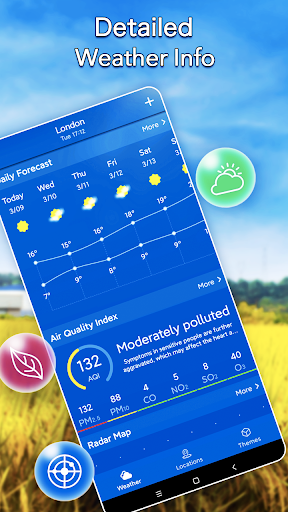
The app also delivers a detailed next 24 or 72 hour forecast with temperature curves and hour-by-hour metrics you can actually act on.
Each hour includes real feel temperature, weather briefing, humidity, UV index, visibility, dew point, and precipitation probabilities for rain, snow, or icing.
Wind direction, wind speed, and wind level are presented alongside cloud cover, giving a balanced picture rather than just “sun or rain.”
Looking further ahead, you can switch to the next 10 or 25 days with a hyperbolic temperature change curve and daily max and min values.
Daily details include real feel temperature, brief conditions, humidity, ultraviolet index, precipitation/icing probability, and lightning probability.
Sunrise and sunset times round out the long-range view, which is helpful for outdoor planning and location-based service scheduling.
Today’s weather details add precision: real feel temperature, sunrise and sunset, humidity, UV, visibility, dew point, altitude, and cloud cover.
For health and safety planning, the Air Quality Index adds an actionable layer with air quality level and travel recommendations.
It covers PM10, PM2.5, carbon monoxide, nitrogen dioxide, sulfur dioxide, ozone, and quality level, plus guidance for different alert levels.
There is also a real-time weather radar cloud map, letting you browse radar images quickly without hunting across multiple screens.
City Management is another strong point: auto-location, manual add and remove, reorder cities, and search with fuzzy matching.
The theme style supports weather-specific icons and backgrounds, multiple widget notification bar layouts, and custom backgrounds from your device.
Finally, unit and format settings let you choose temperature, precipitation, visibility, wind speed, pressure, hour format, and date format.
As a “life assistant” concept, it reads like a service you can trust daily, which aligns well with high-retention subscription models and premium mobile dashboards.
Users generally like how quickly the app surfaces what they need, especially when the weather changes abruptly during commutes.
Many reviews highlight the clarity of alerts, noting that affected area, time windows, and color-coded severity reduce guesswork.
Several people appreciate the hour-by-hour breakdown for humidity, UV index, visibility, dew point, and wind, saying it feels more complete than typical free forecasts.
Longer-range planning also gets praise, with users mentioning the smooth temperature curve and the inclusion of sunrise and sunset times.
City management often earns positive feedback, particularly for travelers who add multiple locations and rely on fuzzy search.
Widget customization is another recurring theme, with users liking themed icons, layout variety, and the option to use personal photos.
Air quality features receive mixed-but-positive reactions: some users want clearer threshold explanations, while others call the travel recommendations useful.
Overall, the reviews suggest the app is best for users who want practical detail, not just a weather icon, and who value dependable updates.
Latest functions focus on improving forecast readability, making temperature curves and daily summaries easier to interpret at a glance.
Radar browsing enhancements aim to reduce friction when checking cloud movement quickly before outdoor plans or travel.
Recent UI refinements also improve theme and widget styling options, supporting more layout variety for different notification bar styles.
Additional improvements to unit and format handling help users match local habits for hour and date presentation.
Support channels encourage suggestions and feedback, which helps the team refine the experience based on real user needs.
From a business perspective, consistent update cadence can support ongoing subscription value by maintaining accuracy and usability over time.
The app is designed for mobile use and relies on your device location services for smooth city auto-detection.
For best performance, keep your operating system updated and ensure the app has enough storage for widget data and cached radar views.
Older devices may still run the core forecast features, but radar loading and widget rendering can vary by hardware capability.
If you use multiple cities, stable connectivity improves forecast refresh and reduces delays in alert display.
For travelers and frequent commuters, consistent performance is especially important because accurate weather timing drives real decisions.
Location permission supports automatic city detection, letting the app provide nearby real-time weather and localized weather alerts.
Network access is required for real-time weather updates, Weather Alert details, radar cloud map imagery, and air quality calculations.
Widget permissions or related display access may be needed so the app can show weather information in your preferred widget layout style.
Photo access may be requested when you choose a custom weather background from your mobile device.
Reviewing these permissions helps align the app’s functionality with user expectations for privacy and transparency.
If you ever have questions or suggestions, feedback through [email protected] is presented as the primary support route.


Welcome to AppSparkle - your independent guide to discovering trending and popular apps. Our mission is to provide a user-friendly platform highlighting popular apps available on official stores.
At AppSparkle, we gather and present app information to help you explore options across Google Play and the Apple Store. Our descriptions are based on public sources and aim for accuracy, but we encourage verifying details directly on official store pages.
Important Notice:
AppSparkle is an independent third-party platform. We are not affiliated with, endorsed by, or officially connected to any app developers, brands, Google Play, Apple App Store, or their parent companies. All app names, logos, and trademarks belong to their respective owners.
We strive to make app discovery straightforward. Links provided will direct you to secure download pages on Google Play or the Apple App Store.


