
ADVERTISEMENT
ADVERTISEMENT
In today’s fast-paced world, effective financial management is essential, and the Huntington Mobile app seeks to deliver just that. With user-friendly features designed for convenience and security, this app empowers customers to manage their finances seamlessly. Below, we’ll explore the app’s features, user ratings, updates, and requirements to provide a comprehensive review.
The Huntington Mobile app is replete with a variety of functionalities that cater to both basic banking needs and advanced financial management. Here are some of the essential features you can expect when downloading this app:
1. Manage Your Accounts:
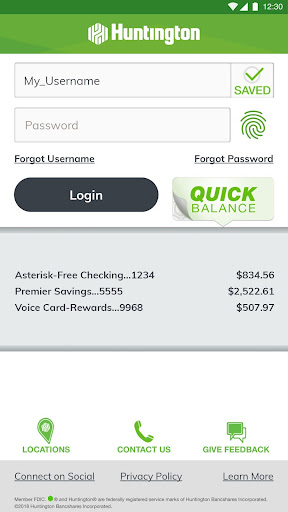
- The app allows users to check account balances swiftly, eliminating the need for a full login with the Huntington Quick Balance feature.
- Real-time account alert messages can be activated using Huntington Heads Up®, thereby enabling users to stay informed about their financial status.
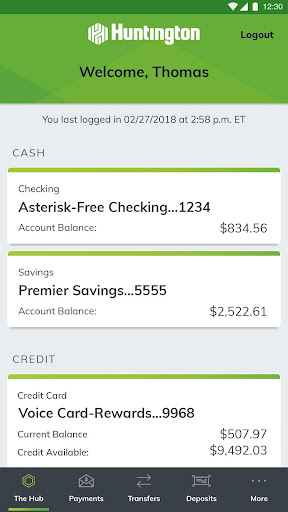
- Users can effortlessly view up-to-date information regarding their Huntington accounts, including pending transactions, and search through transaction history.
- The app also facilitates managing overdraft options, providing users with greater control over their spending.
2. Send Money with Zelle®:
- A standout feature of the Huntington Mobile app is its integration with Zelle®, allowing users to send and receive money directly through their Huntington accounts.
- This feature enhances peer-to-peer transactions by working with friends and family who hold U.S. bank accounts, thus simplifying financial interactions.
3. Pay Bills:
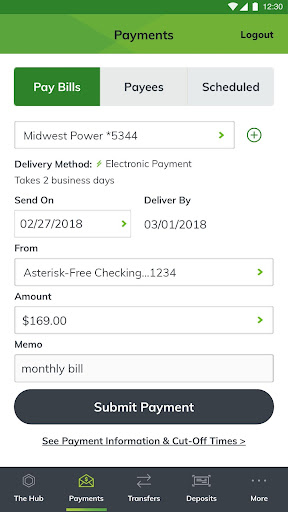
- Users can pay individuals or businesses quickly and conveniently from the app.
- The app provides payment summaries, including amount, payment date, and receipts upon completion, ensuring transparency in payment transactions.
- Managing payees is equally simple; users can add, edit, or delete payees to customize their payment experience.
4. Transfer Money:
- The app supports the transfer of funds between Huntington accounts or from external banks, giving users flexibility in managing their finances.
- Users can choose their preferred transfer date, enhancing the scheduling of financial transactions and providing receipts for each transfer.
5. Manage Your Debit Card:
- The app allows users to activate their ATM or debit cards directly from their mobile devices.
- Additionally, users can easily change their PIN, enhancing the app's utility as a comprehensive financial management tool.
6. Manage Checks:
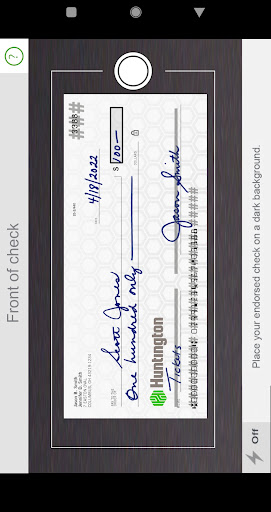
- Users can deposit checks by taking photos, securing funds directly into their accounts.
- Ordering checks through the app adds further convenience for users who still prefer traditional banking methods.
7. Savings and Budgeting Tools:
- The app boasts features for setting and tracking savings goals, viewing spending categories, and establishing monthly budgets.
- Users receive insights into spending patterns, enabling them to identify unnecessary funds that could be transferred to savings accounts—helping them build their financial security.
8. Security:
- The app ensures secure logins through options like usernames/passwords, Face ID, or Fingerprint Login.
- Users can instantly lock their debit or credit cards, enhancing account safety in case of loss.
- The Huntington Personal Online Guarantee further protects users from unauthorized transactions, fostering trust in the app’s security measures.
9. Connect with Us Anytime:
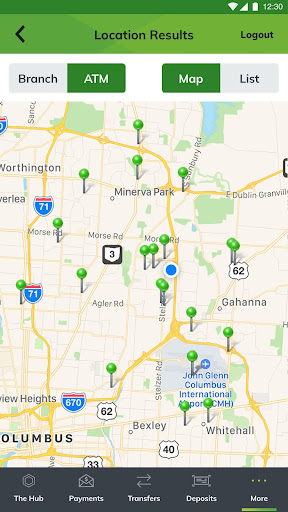
- The app features a functionality to locate nearby ATMs and branches or search by street address.
- Users can make phone calls directly through the app to connect with representatives for assistance.
The diverse range of features available in the Huntington Mobile app makes it a compelling choice for users looking for a robust solution to managing their finances on the go.
Understanding the user experience before downloading the Huntington Mobile app is critical. Here’s a roundup of user reviews and ratings that highlight both the strengths and weaknesses of the app:
1. Positive Reviews:
- Users frequently praise the app's user-friendly interface, emphasizing how easy it is to navigate through various functionalities like the account management and money transfer features.
- Many appreciate the integration with Zelle®, pointing out how it simplifies sending money to friends and family without the hassles of cash.
- The check deposit feature has received commendations for its convenience, allowing users to manage their banking needs without visiting a physical branch.
2. Constructive Feedback:
- Some users have expressed concerns regarding app stability during peak usage hours, noting occasional crashes or slow loading times.
- A few reviews indicate a desire for more comprehensive budgeting tools, as some users feel the existing features do not meet all their personal finance tracking needs.
Overall, the app receives generally favorable ratings, with most users recommending it as an effective solution for mobile banking. The user reviews reflect an ongoing effort by Huntington to improve user experience, as feedback continues to inform app development.
Regular updates are crucial for maintaining app functionality and security. The developers behind the Huntington Mobile app understand this necessity and frequently roll out updates that enhance user experience. As of this writing, the latest version includes:
1. Enhanced Security Measures:
- Recent updates have improved overall security protocols, ensuring that user data is even more protected against potential threats. Logging in with biometric features has been simplified and fortified.
2. UI/UX Improvements:
- Several user interface enhancements provide a more intuitive experience, allowing users to navigate between features without frustration.
- Animated transitions optimize usability, particularly for financial tools and alerts.
3. Budgeting Tool Enhancements:
- The budgeting features have been refined to include additional customizable options. Users can now categorize their spending more granularly and receive tailored financial advice based on their habits.
For potential users, downloading the latest version of the Huntington Mobile apk ensures access to these vital functionalities and improvements, allowing for a seamless financial experience.
To enjoy the full benefits of the Huntington Mobile app, prospective users should take note of the following device requirements:
1. iOS Devices:
- The app is compatible with iPhones running iOS 12.0 and later. Users can easily install Huntington Mobile from the App Store.
2. Android Devices:
- For Android users, the app requires devices running Android 6.0 (Marshmallow) or higher. Users can have the Huntington Mobile app downloaded from the Google Play Store for effortless installation.
Ensuring that your device meets these specifications will facilitate a smooth installation and optimal performance of the app.
Upon installation, users must grant certain permissions to the Huntington Mobile app for it to function effectively. These include:
1. Location Access:
- The app requests location services to help users find nearby ATMs and branches, greatly enhancing convenience.
2. Camera Access:
- Permission to access the camera is necessary for the check deposit feature, allowing users to take photos of their checks securely.
3. Storage Access:
- Users may need to grant storage access to enable transaction receipts and other financial documents to be saved to their devices.
By clearly outlining these permission requirements upfront, the Huntington Mobile app promotes transparency and user trust in the application.
The Huntington Mobile app stands as a robust financial tool for users seeking to manage their money efficiently, whether at home or on the go. Its rich features, positive user feedback, continuous updates, and transparent permissions make it a valuable asset in today's digital banking landscape. If you’re looking to simplify your banking experience and enhance your financial literacy, the free Huntington Mobile app is worth considering. Simply download Huntington Mobile today and take control of your financial future.
Welcome to AppSparkle - your independent guide to discovering trending and popular apps. Our mission is to provide a user-friendly platform highlighting popular apps available on official stores.
At AppSparkle, we gather and present app information to help you explore options across Google Play and the Apple Store. Our descriptions are based on public sources and aim for accuracy, but we encourage verifying details directly on official store pages.
Important Notice:
AppSparkle is an independent third-party platform. We are not affiliated with, endorsed by, or officially connected to any app developers, brands, Google Play, Apple App Store, or their parent companies. All app names, logos, and trademarks belong to their respective owners.
We strive to make app discovery straightforward. Links provided will direct you to secure download pages on Google Play or the Apple App Store.


